How This Prompt Enhances Photos to Ultra HD With High Accuracy and Realism

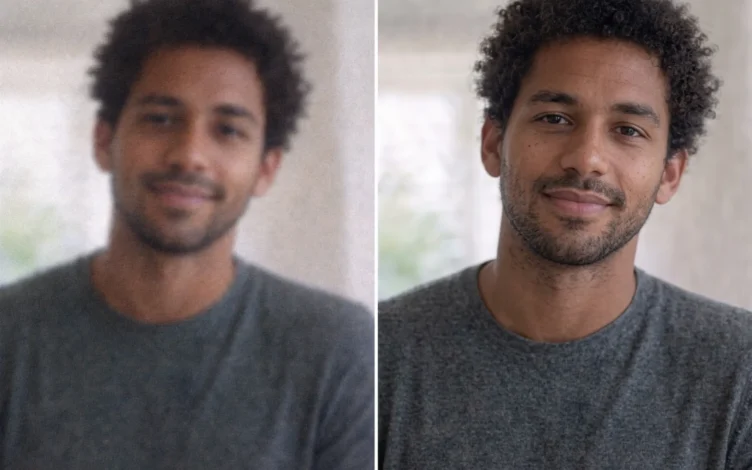
In the world of AI photo editing, prompts have become one of the most important tools for achieving professional results. The prompt featured here is one of the strongest options for realistic photo enhancement without changing a person’s facial features, making it ideal for photographers, content creators, and even tech-focused websites.
In this article, we break down the prompt in a clear and practical way, explaining each section and how it influences the final result.
What Is the Goal of This Prompt?
The main purpose of this prompt is to:
- Turn low-quality images into Ultra HD high-clarity photos
- Remove common flaws such as:
- Noise
- Blur
- Compression artifacts
- Preserve the person’s identity exactly as it is
In simple terms: improve the image only, without excessive beautification or altering facial features.
Part One: Quality and Detail Enhancement
Text:
Enhance the image to ultra-high definition with maximum clarity and realistic detail…
This section tells the AI to:
- Increase resolution to the highest possible level
- Improve clarity
- Reveal fine micro-details
What Does That Include?
- Skin texture
- Hair strands
- Fabric texture
- Background surfaces
The goal is to make the photo look like it was captured using a modern professional camera.
Removing Image Defects
Text:
Remove blur, noise, grain, color fading, and compression artifacts…
This part is especially important because it targets common image problems:
- Reducing low-light noise
- Fixing compressed images such as social media or messaging app photos
- Restoring faded colors
Most importantly, it aims to do this without damaging original details.
Maintaining a Natural Look
Text:
Maintain authentic skin texture with natural pores…
This is where the difference between professional and amateur editing becomes clear.
The prompt specifically asks for:
- Natural visible pores
- No excessive face smoothing
- Avoiding the well-known “plastic skin” effect
Why Does This Matter?
Many AI tools tend to:
- Over-smooth faces
- Reduce realism
This prompt, by contrast, puts realism first.
Improving Color and Lighting
Text:
Correct color balance to restore natural skin tones…
This section focuses on:
- Natural skin tone correction
- Better contrast
- Expanded dynamic range
Important Note:
All of these enhancements are intended to be subtle and controlled so the original mood of the image remains intact.
Preserving the Original Composition
Text:
Retain the original framing, composition, camera angle…
This means:
- Do not change the shooting angle
- Do not alter the background
- Keep posture and facial expression unchanged
In other words: the same photo, only higher quality.
The Strict Rule (Most Important Section)
Text:
Hard rule: Do not modify facial structure…
This is the most important line in the prompt because it defines the difference between:
- Enhancing the photo ✔️
- Changing the person ❌
It Fully Prevents:
- Changing facial features
- Altering body shape
- Changing age
- Changing hairstyle
- Modifying facial expressions
Goal:
Preserve the person’s identity 100% without manipulation.
Why Is This Prompt So Powerful?
Because it combines:
- Professional image enhancement
- Realistic output
- Identity preservation
That makes it ideal for:
- Portrait photos
- Personal images
- Product photos featuring people
- Review and technology websites
How to Use This Prompt Correctly
For the best result:
- Use an original image with at least moderate quality
- Avoid heavily damaged photos
- Use AI tools that support photo enhancement
- Do not combine it with conflicting prompts
Ready-to-Use Prompt
You can copy and use the following prompt directly:
Enhance the image to ultra-high definition with maximum clarity and realistic detail. Remove blur, noise, grain, color fading, and compression artifacts while preserving the subject's exact identity, proportions, and natural appearance. Restore sharp focus with refined micro-details in skin, hair strands, fabric texture, and background surfaces. Maintain authentic skin texture with natural pores and tonal variation, avoiding over-smoothing, artificial sharpening halos, or plastic effects.

Correct color balance to restore natural skin tones and accurate hues while preserving the original mood. Improve exposure, dynamic range, and contrast subtly to add depth and realism without altering the lighting direction. Retain the original framing, composition, camera angle, posture, facial expression, background elements, and overall atmosphere.

Hard rule: Do not modify facial structure, facial features, expression, hairstyle, body shape, pose, clothing, age, or identity in any way. The face must remain exactly the same as the original image, only clearer, sharper, and more detailed.
Final Thoughts
This prompt is one of the best options for anyone who wants to:
- Enhance photo quality professionally
- Keep a natural appearance
- Avoid unrealistic edits
It can be a valuable tool for anyone working with photography or digital content.
Disclaimer: We can not guarantee that the information on this page is 100% correct.